Start-up page:
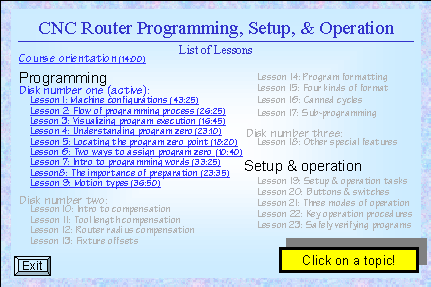
Learn the most popular form of CNC
woodworking machinery - for the most popular CNC control in the industry!
This course is presented using our proven key
concepts approach, which allows us to stress the reasons why things are
done as importantly as how they're done. The key concepts also help keep
a light at the end of the tunnel, since if you can master ten important
concepts, you're well on your way to becoming proficient with CNC routers and
woodworking machining centers.
Our primary goal is to help students become
proficient with CNC routers and woodworking machining centers in three important
areas: programming, setup, and operation. We've even made the setup and
operation portion of the course in a self-contained manner, since we assume some
students will only be interested in running (not necessarily programming) this
equipment.
We do assume that students viewing this course
have a basic knowledge of woodworking - and understand the operations that
routers can perform (drilling, routing, etc.). Truly, this kind of person
already knows what they want the machine to do - it is a relatively
simple matter of learning how to tell the machine what it is they want it to do!
When it comes to CNC, we assume nothing. Using a building blocks approach, we'll
explain how to program, setup, and operate CNC routers and woodworking machining
centers from the ground up.
Easy navigation
Once you've invoked our courseware, getting
around is as easy as navigating the World Wide Web. Each "click-able"
link is underlined, and once used, will change to another color (showing you
where you've been). You'll have a backup key to return to the previous page.
CNC Controls Covered
This course is built around the most popular
control in the industry - Fanuc. Yet even in Fanuc's product line, there are
several models. When it comes to programming, there is very little that varies
from one model to the next - and we do point out these minor differences. When
it comes to operation, we include a series of operation handbooks (right in the
student manual) that cover all current controls (0M, 6M, 10M, 11M, 15M, 16M,
18M, 20M, &21M). Since Fanuc is so popular, many control manufacturers claim
to be Fanuc-compatible (Yasnac, Mitsubishi, Delta Tau, Flashcut, among
others).
Why Microsoft PowerPoint?
All presentations have been developed using
Microsoft PowerPoint for Windows 95/98, which is fast becoming the industry
standard for computer generated presentations. We use the freely distributed
PowerPoint Viewer to display all presentations. PowerPoint Viewer is included.
|
|
System requirements: You must have a multimedia
computer with Windows 95 or above and a minimum of 64 megs of internal memory to
run the courseware.
|
Course Includes:
- Presented by Mike Lynch
- Courseware on 3 CD-ROM disks
- 12 hours, 30 minutes of presentation
- All computer generated graphics and
animations
- 23 lessons
- Easy navigation
- Tutorial
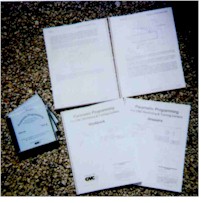
manual (300 pages)
- Workbook containing 23 exercises and 9
programming activities
- Answer book
- One year subscription to The
Optional Stop Newsletter
- Free phone assistance calling to CNC
Concepts INC.
Lessons:
Click
here to see complete outline
- 1: Machine configurations 43:25
- 2: Flow of the programming process 26:25
- 3: Visualizing program execution 16:45
- 4: Understanding program zero 23:10
- 5: Locating the program zero point 18:20
- 6: Two ways to assign program zero 10:40
- 7: Introduction to programming words 33:35
- 8: The importance of preparation 23:35
- 9: Motion Types 36:50
- 10: Introduction to compensation 12:10
- 11: Tool length compensation 30:25
- 12: Router radius compensation 56:05
- 13: Fixture offsets 23:40
- 14: Program formatting 16:30
- 15: Four kinds of program format 56:25
- 16: Canned cycles 44:20
- 17: Sub-programming 20:45
- 18: Other special features of programming
57:25
- 19: Setup and operation tasks 61:40
- 20: Buttons and switches 27:55
- 21: The thee modes of operation 19:10
- 22: The key operation procedures 41:45
- 23: Safely verifying and running programs
35:40


 Click
for details
Click
for details