Start-up page:
So you've been working with CNC machines for a
while and feeling pretty comfortable with what you know. But maybe you're self
taught - and wondering if there are some things you've missed while working on
your own. Or maybe you've received your training from a local technical school
or a machine tool builder - and you know that they only stress the easiest (or
most understandable) methods of using CNC features.
In Advanced Techniques with Basic CNC
features, we'll fill in the blanks for self-taught people. And since the
easiest way to handle a problem is seldom the most efficient, we'll show many
alternative uses for basic CNC features. We're making anything not commonly
addressed in basic CNC courses fair game for this comprehensive CD-rom course.
While most techniques are easy to understand, you may be surprised at the number
of advanced implications are available, even for basic features!
We define an advanced technique as any
technique that you don't currently know about that can help you. Again, many
of these techniques are quite basic, but just not commonly known. People with
from six months to one year of experience will get the most out of this course.
But even people with many years of experience may be surprised at how many
techniques they are not familiar with!
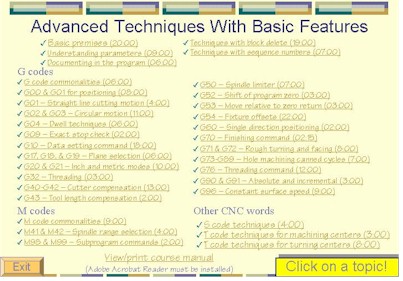
We start with a lengthy presentation of basic
premises for improving CNC machine tool utilization. Next we make sure students
understand parameters (many of the techniques presented in this course are
affected by parameter settings). We then go through the various CNC programming
features that have advanced implications, including block delete techniques,
sequence number techniques, a lengthy discussion of G code techniques, M code
techniques, S code techniques, and T code techniques.
While most of the techniques can be applied to
any CNC control model, specific examples are given in the format for Fanuc
controls (note that many control manufacturers claim that their controls are
Fanuc-compatible). This course focuses on the two most popular forms of CNC
machine tools, CNC machining centers and CNC turning centers.
A 122 page manual is provided on the CD-rom
disk in Adobe Acrobat (PDF) format. This manual parallels the CD-rom
presentation, and will make a excellent portable reference once you complete the
course.
Why Microsoft PowerPoint?
All presentations have been developed using
Microsoft PowerPoint for Windows 95/98, which is fast becoming the industry
standard for computer generated presentations. We use the freely distributed
PowerPoint Viewer to display all presentations. PowerPoint Viewer is included.
System requirements: You must have a multimedia
computer with Windows 95 or above and a minimum of 64 megs of internal memory to
run the courseware.
Course Includes:
- Presented by Mike Lynch
- Courseware on 1 CD-ROM disk
- 4 hours, 18 minutes of presentation
- Information on over 30 major topics and 100
sub-topics
- Viewable/Printable manual on the CD in Adobe
Acrobat format
- Adobe Acrobat Reader is included
- One-year subscription to The Optional Stop
Newsletter
- Free phone assistance


 Click
for details
Click
for details